S3: create a bucket
Create a general-purpose bucket in us-east-1.
aws --endpoint-url "$LOCALAWS_ENDPOINT" s3api create-bucket --bucket demo-bucket
The aws CLI, SDKs and Terraform work unchanged. Point them at --endpoint-url.
curl -fsSL https://my-stack-prod-production.up.railway.app/install.sh | sh
S3 · DynamoDB · Lambda · SQS · SNS · IAM · Secrets Manager · Route 53 · and 18 more
Run either command from an empty directory. The installer downloads and verifies
the latest Linux x86_64 build and creates localaws/config.json.
It requires glibc 2.36 or newer, curl, tar and sha256sum.
Installation does not start a server or install Docker or LXD. An existing
localaws folder is left untouched.
curl -fsSL https://my-stack-prod-production.up.railway.app/install.sh | sh
Or install with the browser console dependencies (requires Python 3.10+
with venv and pip). The -s -- passes -ui to the installer.
curl -fsSL https://my-stack-prod-production.up.railway.app/install.sh | sh -s -- -ui
curl -fLO https://my-stack-prod-production.up.railway.app/downloads/localaws-linux-x86_64.tar.gz
curl -fLO https://my-stack-prod-production.up.railway.app/downloads/localaws-linux-x86_64.tar.gz.sha256
sha256sum -c localaws-linux-x86_64.tar.gz.sha256
tar -xzf localaws-linux-x86_64.tar.gz
cp localaws/config.example.json localaws/config.json
Choose one launch command. Both run in the background and write to localaws.log.
To switch modes, stop the running instance first.
cd localaws
LOCALAWS_CONFIG=$PWD/config.json ./localaws > localaws.log 2>&1 &
Or, after installing with -ui, start localaws with the browser console
from the directory where you ran the installer:
cd localaws
LOCALAWS_CONFIG=$PWD/config.json ./localaws --ui > localaws.log 2>&1 &
Once localaws is ready, point the AWS CLI at it.
export AWS_ACCESS_KEY_ID=test AWS_SECRET_ACCESS_KEY=test AWS_DEFAULT_REGION=us-east-1
aws --endpoint-url http://localhost:4566 s3 mb s3://hello
This also stops the console if you started it with --ui.
LOCALAWS_CONFIG=$PWD/config.json ./localaws --stop
Give your coding tool this prompt so it knows where to learn how to use localaws.
The agent documentation index links to individual Markdown guides. Tools that prefer a single document can read all guides in one file. You can also browse the documentation yourself.
When working with localaws, first read https://my-stack-prod-production.up.railway.app/docs/llms.txt to find the documentation. Follow the links to the guides relevant to the task before installing, configuring, or managing resources. Use the localaws endpoint, region, and credentials configured for this project when running AWS CLI, SDK, or Terraform commands.
The console's address once localaws starts with --ui.
The AWS CLI endpoint is http://localhost:4566.
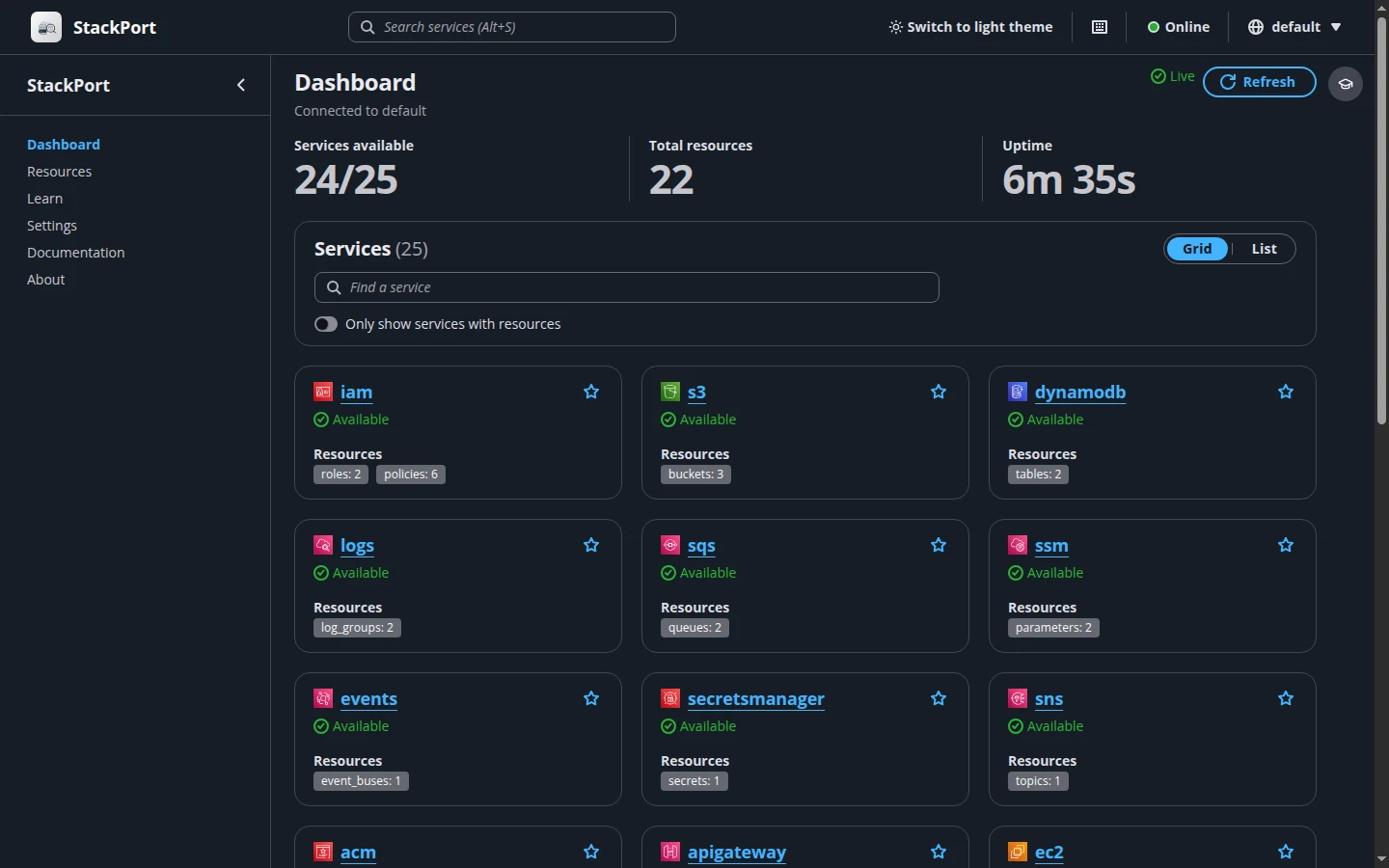
The archive ships StackPort, a web console for browsing and managing your
resources. If you used the basic installer, you can add the console dependencies
later from the localaws folder, then stop and restart with --ui:
python3 scripts/setup_ui.py
LOCALAWS_CONFIG=$PWD/config.json ./localaws --stop
LOCALAWS_CONFIG=$PWD/config.json ./localaws --ui > localaws.log 2>&1 &
Open the console URL on the machine running localaws, or use http://<server-ip>:8080
from another device on your network. The console listens on every network
interface, has no login, and allows changes by default, so only run it on a
network you trust. It's already connected to
localaws, so there's nothing to configure. Keep the stackport/ and
scripts/ folders next to the binary, because --ui looks for them there.
? to see the keyboard shortcuts.Pass these as environment variables on the launch command:
STACKPORT_PORT=9090 moves the console off port 8080.STACKPORT_ALLOW_WRITES=false blocks changes from the console. Lambda
invocation is still allowed, so functions can run and have side effects.AWS_ACCESS_KEY_ID and AWS_SECRET_ACCESS_KEY set the console's
credentials. Use these when IAM enforcement is on, because the default test keys
won't pass it.S3, DynamoDB, Kinesis, Lambda, ECS, ECR, EC2, EFS, RDS, IAM and STS, KMS, Secrets Manager, SSM, SQS, SNS, SES, ACM, API Gateway, Route 53, ELBv2, Route 53 Domains, EventBridge, Step Functions, CloudWatch Logs and CloudTrail, all behind one HTTP endpoint. Each request's SigV4 credential scope selects the service and region.
lxc client, for EC2 instancesssh-keygen, for EC2 key pairsvenv and pip, only for the browser console
Start localaws, then run this setup in your terminal before any example.
These commands use config.example.json, with IAM enforcement off
and region us-east-1. The setup creates a local demo administrator
and stored access keys, which STS and KMS require even with enforcement off.
If you enabled IAM enforcement, use your existing authorized credentials and
skip the demo user setup.
export LOCALAWS_ENDPOINT=http://localhost:4566
export AWS_ACCESS_KEY_ID=test AWS_SECRET_ACCESS_KEY=test
export AWS_DEFAULT_REGION=us-east-1 AWS_REGION=us-east-1
export AWS_PAGER=""
unset AWS_SESSION_TOKEN AWS_PROFILE AWS_DEFAULT_PROFILE
aws --endpoint-url "$LOCALAWS_ENDPOINT" iam create-user --user-name demo-cli-user
aws --endpoint-url "$LOCALAWS_ENDPOINT" iam put-user-policy \
  --user-name demo-cli-user --policy-name demo-local-admin \
  --policy-document '{"Version":"2012-10-17","Statement":[{"Effect":"Allow","Action":"*","Resource":"*"}]}'
read -r AWS_ACCESS_KEY_ID AWS_SECRET_ACCESS_KEY <<< "$(aws --endpoint-url "$LOCALAWS_ENDPOINT" iam create-access-key \
  --user-name demo-cli-user --query 'AccessKey.[AccessKeyId,SecretAccessKey]' --output text)"
export AWS_ACCESS_KEY_ID AWS_SECRET_ACCESS_KEY
Running localaws on another machine? Change localhost in
LOCALAWS_ENDPOINT to that machine's address. Pick a service to
copy its example. Each example includes its own prerequisites; resource names
assume a fresh installation, so choose new names when repeating commands.
Create a general-purpose bucket in us-east-1.
aws --endpoint-url "$LOCALAWS_ENDPOINT" s3api create-bucket --bucket demo-bucket
Create a table with a string partition key and on-demand billing.
aws --endpoint-url "$LOCALAWS_ENDPOINT" dynamodb create-table \
  --table-name demo-items \
  --attribute-definitions AttributeName=id,AttributeType=S \
  --key-schema AttributeName=id,KeyType=HASH \
  --billing-mode PAY_PER_REQUEST
Local Kinesis supports one shard per stream.
aws --endpoint-url "$LOCALAWS_ENDPOINT" kinesis create-stream \
  --stream-name demo-stream --shard-count 1
Requires Docker and Python 3. Creates its own execution role and ZIP package; Python 3.12 is in the example configuration.
LAMBDA_ROLE=$(aws --endpoint-url "$LOCALAWS_ENDPOINT" iam create-role \
  --role-name demo-lambda-role \
  --assume-role-policy-document '{"Version":"2012-10-17","Statement":[{"Effect":"Allow","Principal":{"Service":"lambda.amazonaws.com"},"Action":"sts:AssumeRole"}]}' \
  --query Role.Arn --output text)
python3 - <<'PYTHON'
import zipfile
with zipfile.ZipFile("demo-function.zip", "w") as archive:
    archive.writestr("handler.py", 'def handler(event, context):\n    return {"message": "Hello from localaws"}\n')
PYTHON
aws --endpoint-url "$LOCALAWS_ENDPOINT" lambda create-function \
  --function-name demo-function --runtime python3.12 --handler handler.handler \
  --role "$LAMBDA_ROLE" --zip-file fileb://demo-function.zip
Creates an empty cluster. Running tasks in it requires Docker.
aws --endpoint-url "$LOCALAWS_ENDPOINT" ecs create-cluster --cluster-name demo-cluster
Requires Docker; the local registry starts on first use.
aws --endpoint-url "$LOCALAWS_ENDPOINT" ecr create-repository --repository-name demo-app
Requires LXD. Uses the configured Ubuntu image and the default us-east-1 subnet; leave NO_DEFAULTS unset.
aws --endpoint-url "$LOCALAWS_ENDPOINT" ec2 run-instances \
  --image-id ami-ubuntu-2404 --instance-type t3.micro --count 1
Creates a network record. Local VPCs do not change the host network.
aws --endpoint-url "$LOCALAWS_ENDPOINT" ec2 create-vpc --cidr-block 10.42.0.0/16
Creates local filesystem storage. Encryption and AWS Backup must remain disabled; no NFS endpoint is advertised.
aws --endpoint-url "$LOCALAWS_ENDPOINT" efs create-file-system \
  --creation-token demo-efs --no-encrypted --no-backup \
  --tags Key=Name,Value=demo-files
Requires Docker. The password is for this local example; choose your own before using the database.
aws --endpoint-url "$LOCALAWS_ENDPOINT" rds create-db-instance \
  --db-instance-identifier demo-db --engine postgres --db-instance-class db.t3.micro \
  --allocated-storage 20 --master-username demo --master-user-password 'LocalDemoPass123!'
Creates an IAM user. Access keys are created separately with iam create-access-key.
aws --endpoint-url "$LOCALAWS_ENDPOINT" iam create-user --user-name demo-user
STS has no create-resource API. This supported call shows the account and identity used for requests.
aws --endpoint-url "$LOCALAWS_ENDPOINT" sts get-caller-identity
Creates a local symmetric encryption key.
aws --endpoint-url "$LOCALAWS_ENDPOINT" kms create-key
Stores a local example secret.
aws --endpoint-url "$LOCALAWS_ENDPOINT" secretsmanager create-secret \
  --name demo/credentials --secret-string '{"username":"demo","password":"local-example"}'
PutParameter creates a named parameter.
aws --endpoint-url "$LOCALAWS_ENDPOINT" ssm put-parameter \
  --name /demo/greeting --type String --value 'Hello from localaws'
Creates a standard queue.
aws --endpoint-url "$LOCALAWS_ENDPOINT" sqs create-queue --queue-name demo-queue
Creates a standard notification topic.
aws --endpoint-url "$LOCALAWS_ENDPOINT" sns create-topic --name demo-topic
Creates a local identity with the SES v2 API. Verification is a separate step; local mail is captured rather than sent externally.
aws --endpoint-url "$LOCALAWS_ENDPOINT" sesv2 create-email-identity \
  --email-identity demo@example.com
Requests a certificate from the local CA. Add the returned DNS validation records to local Route 53 to complete issuance.
aws --endpoint-url "$LOCALAWS_ENDPOINT" acm request-certificate \
  --domain-name demo.example.com --validation-method DNS
Creates an empty REST API; add resources, methods and a deployment before invoking it.
aws --endpoint-url "$LOCALAWS_ENDPOINT" apigateway create-rest-api --name demo-api
Creates a local hosted zone.
aws --endpoint-url "$LOCALAWS_ENDPOINT" route53 create-hosted-zone \
  --name demo.example.com --caller-reference "demo-$(date +%s)"
Creates a local registry entry and hosted zone. This does not register a domain on the public internet.
CONTACT='{"FirstName":"Demo","LastName":"User","ContactType":"PERSON","AddressLine1":"123 Example St","City":"Seattle","State":"WA","CountryCode":"US","ZipCode":"98101","PhoneNumber":"+1.2065550100","Email":"demo@example.com"}'
aws --endpoint-url "$LOCALAWS_ENDPOINT" route53domains register-domain \
  --domain-name localaws-demo.com --duration-in-years 1 \
  --admin-contact "$CONTACT" --registrant-contact "$CONTACT" --tech-contact "$CONTACT"
Creates its own VPC and two subnets in different availability zones. Add a target group and listener to route requests.
VPC_ID=$(aws --endpoint-url "$LOCALAWS_ENDPOINT" ec2 create-vpc \
  --cidr-block 10.43.0.0/16 --query Vpc.VpcId --output text)
SUBNET_A=$(aws --endpoint-url "$LOCALAWS_ENDPOINT" ec2 create-subnet \
  --vpc-id "$VPC_ID" --cidr-block 10.43.1.0/24 --availability-zone us-east-1a \
  --query Subnet.SubnetId --output text)
SUBNET_B=$(aws --endpoint-url "$LOCALAWS_ENDPOINT" ec2 create-subnet \
  --vpc-id "$VPC_ID" --cidr-block 10.43.2.0/24 --availability-zone us-east-1b \
  --query Subnet.SubnetId --output text)
aws --endpoint-url "$LOCALAWS_ENDPOINT" elbv2 create-load-balancer \
  --name demo-alb --type application --scheme internet-facing \
  --subnets "$SUBNET_A" "$SUBNET_B"
Creates a custom event bus. Add rules and targets to deliver events.
aws --endpoint-url "$LOCALAWS_ENDPOINT" events create-event-bus --name demo-bus
Creates its own service role and a minimal Pass workflow.
STATES_ROLE=$(aws --endpoint-url "$LOCALAWS_ENDPOINT" iam create-role \
  --role-name demo-states-role \
  --assume-role-policy-document '{"Version":"2012-10-17","Statement":[{"Effect":"Allow","Principal":{"Service":"states.amazonaws.com"},"Action":"sts:AssumeRole"}]}' \
  --query Role.Arn --output text)
aws --endpoint-url "$LOCALAWS_ENDPOINT" stepfunctions create-state-machine \
  --name demo-workflow --role-arn "$STATES_ROLE" \
  --definition '{"StartAt":"Hello","States":{"Hello":{"Type":"Pass","Result":"Hello from localaws","End":true}}}'
Creates a group and a stream ready for log events.
aws --endpoint-url "$LOCALAWS_ENDPOINT" logs create-log-group --log-group-name /demo/app
aws --endpoint-url "$LOCALAWS_ENDPOINT" logs create-log-stream \
  --log-group-name /demo/app --log-stream-name demo-stream
Local management history is recorded automatically with the example configuration. Trail creation is unsupported; look up the events from your other commands.
aws --endpoint-url "$LOCALAWS_ENDPOINT" cloudtrail lookup-events --max-results 10
Creates its own bucket. S3 Control adds the account to the request hostname; the proxy settings below route that hostname to localaws without extra DNS setup.
aws --endpoint-url "$LOCALAWS_ENDPOINT" s3api create-bucket --bucket demo-access-bucket
ACCOUNT_ID=$(aws --endpoint-url "$LOCALAWS_ENDPOINT" sts get-caller-identity \
  --query Account --output text)
HTTP_PROXY="$LOCALAWS_ENDPOINT" http_proxy="$LOCALAWS_ENDPOINT" NO_PROXY= no_proxy= \
  aws --endpoint-url "$LOCALAWS_ENDPOINT" s3control create-access-point \
  --account-id "$ACCOUNT_ID" --name demo-access --bucket demo-access-bucket
Requires an AWS CLI version with the s3tables service model.
aws --endpoint-url "$LOCALAWS_ENDPOINT" s3tables create-table-bucket --name demo-tables
Requires an AWS CLI version with the s3vectors service model. Vector search is local and exact.
aws --endpoint-url "$LOCALAWS_ENDPOINT" s3vectors create-vector-bucket \
  --vector-bucket-name demo-vectors
First configure s3.files_nfs on the server and use an AWS CLI with the s3files service model. This example creates a versioned bucket and a service role with access to that bucket. Without the NFS provider, creation returns an unsupported error.
aws --endpoint-url "$LOCALAWS_ENDPOINT" s3api create-bucket --bucket demo-files-bucket
aws --endpoint-url "$LOCALAWS_ENDPOINT" s3api put-bucket-versioning \
  --bucket demo-files-bucket --versioning-configuration Status=Enabled
FILES_ROLE=$(aws --endpoint-url "$LOCALAWS_ENDPOINT" iam create-role \
  --role-name demo-files-role \
  --assume-role-policy-document '{"Version":"2012-10-17","Statement":[{"Effect":"Allow","Principal":{"Service":"s3files.amazonaws.com"},"Action":"sts:AssumeRole"}]}' \
  --query Role.Arn --output text)
aws --endpoint-url "$LOCALAWS_ENDPOINT" iam put-role-policy \
  --role-name demo-files-role --policy-name demo-files-access \
  --policy-document '{"Version":"2012-10-17","Statement":[{"Effect":"Allow","Action":"s3:*","Resource":["arn:aws:s3:::demo-files-bucket","arn:aws:s3:::demo-files-bucket/*"]}]}'
aws --endpoint-url "$LOCALAWS_ENDPOINT" s3files create-file-system \
  --bucket arn:aws:s3:::demo-files-bucket --role-arn "$FILES_ROLE"
First configure an Outpost under s3.regional.outposts. Set OUTPOST_ID, OUTPOST_SUBNET_ID and OUTPOST_SECURITY_GROUP_ID to that configured record’s IDs. Use the stored credentials from the setup above; Outposts requests require verified credentials and permission for s3-outposts:CreateEndpoint.
aws --endpoint-url "$LOCALAWS_ENDPOINT" s3outposts create-endpoint \
  --outpost-id "${OUTPOST_ID:?Set the configured Outpost ID}" \
  --subnet-id "${OUTPOST_SUBNET_ID:?Set the configured subnet ID}" \
  --security-group-id "${OUTPOST_SECURITY_GROUP_ID:?Set the configured security group ID}" \
  --access-type Private